Match 4
- status : complete
- code : match4
- Date(s) : 2025
- Platform(s) : MD
- By(s) : Kyuchumimo
Data retrieved from itch.io
- ↪ https://kyuchumimo.itch.io/match-4
- by : Kyuchumimo
- tags : 16-bit, 8-Bit, Game Boy, Sega Genesis, Two Player
- status : Released
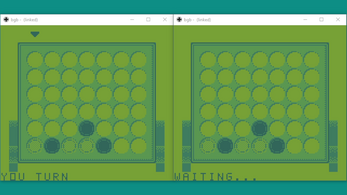
DISCLAIMER: This game is not licensed, endorsed or sponsored by Nintendo nor SEGA corporation.[Game Boy] Powered by GBDK-2020, hUGEDriver and VGM2GBSFX[GENESIS / Mega Drive] Powered by SGDK and XGM2Physics simulations done in PymunkCode (C, procedural) and Graphics by KyuchumimoMusic provided by sl3DZThanks to bbbbbr for providing pictures of the software running on real hardwareThanks to EricDMG01 for providing a Mega EverDrive PRO to test on real hardware."Match 4: Crossplay video game of Four-In-A-Row for two players"❕ To play this game you need two compatible systems (see list below), two reprogrammable cartridges / flashcarts and a game link cable or custom cable.SYSTEMCOMPATIBLEGame Boy™ (1989)⭕Super Game Boy™ (1994)❌Game Boy™ Pocket (1996)⭕Super Game Boy™ 2 (1997)⭕Game Boy™ Color (1998)⭕Game Boy™ Advance (2001)⭕Game Boy™ Advance SP (2003)⭕Game Boy™ Player (2003)⭕Game Boy™ Micro (2005)❌[NTSC] SEGA® Genesis® / Mega Drive (1988)⭕[NTSC] SEGA® Genesis® 2 / Mega Drive 2 (1993)⭕[NTSC] SEGA® Genesis CDX™ / Multi-Mega (1994)⭕[NTSC] SEGA® Genesis® Nomad™ (1995)⭕[NTSC] SEGA® Genesis® 3 (1998)⭕[NTSC] SEGA® Genesis® Arcade Ultimate Portable Player / Gopher (2007)❌[NTSC] SEGA® Genesis® Classic Game Console / Firecore (2012)❓[NTSC] SEGA® Genesis® Flashback (2018)❌[NTSC] SEGA® Genesis® Mini (2019)❌[NTSC] SEGA® Genesis® Mini 2 (2022)❌MicroPython compatible development board⭕I/O port 2 on SEGA Genesis / Mega Drive compatible systems is used to establish communication similar to the link port on Game Boy compatible systems, it is therefore necessary to build an adapter.I/O port 2Description1-2SERIAL OUT3SERIAL IN4SERIAL MASTER CLOCK5-6SERIAL DATA (NOT IMPLEMENTED / NOT USED)7-8GROUND9-NOTE: The SERIAL IN and SERIAL OUT signals must be crossed, in other words, the SERIAL IN signal of one system must go to the SERIAL OUT signal of the other system and vice versa.On SEGA Genesis / Mega Drive compatible systems, since the software relies on a fixed frequency of the master clock to establish communication, it is only compatible with NTSC systems.TROUBLESHOOTING• COMMUNICATION ERROR screenThis screen can appear for several reasons, such as disconnection of the cables during a data transaction either caused by a bad connection of the cables or done on purpose, making a move too soon or receiving unexpected data.Restart the systems and try to establish a game again.ADVICE: Communication works by switching between master-slave and slave-master roles. This is seen in the message area as "WAITING..." and "YOUR TURN". Do not try to make a move instantly (e.g. by pressing A repeatedly) without waiting for the other system to be ready (WAITING...). Think first where you are going to drop the chip and then confirm with A. Otherwise an error screen may appear.
Screenshots